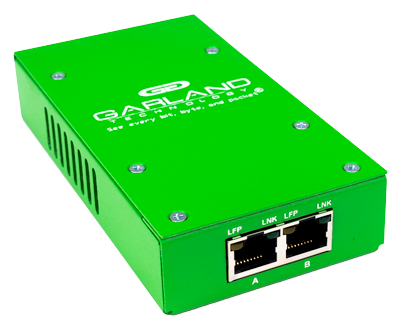
The FieldTAP quickly connects to an IT network and copies packet-level data that can be viewed via a laptop. By mirroring network traffic between one or two network devices and aggregating the copies out the USB 3.0 monitoring port, the FieldTAP can help troubleshoot IT issues wherever they occur.
The FieldTAP is sized to fit conveniently in a pocket, backpack, or IT tool kit. It’s the perfect companion to a laptop equipped with WiresharkTM or other packet analyzers. It plugs into a laptop's USB 3.0 port, keeping the laptop’s network card connected to a local network.
Key Features
- (2) copper RJ-45 ports
- Functions as a dual media converter
- Supports tap 'breakout' mode
- Unidirectional Data Diode design
- Aggregates both sides of traffic to a single USB 3.0 monitoring port
- Durable, metal chassis
- No IP address, no MAC address
- Portable, Plug-and-Play design
- Easy configuration; DIP switches on the back
- Passes physical errors
- Supports jumbo frames
- Pocket-sized and lightweight (0.45 lbs / 0.2041 kg)
- Low power draw: <0.83W (fiber SFP) / <1.0W (copper SFP)
- TAA compliant, manufactured in the USA
Benefits
- Security and monitoring tools receive 100% of the packets
- No dropped packets, ensuring reliable visibility
- Easy to install with zero configuration required
- Invisible to hackers and to the network
- Troubleshoot IT issues anywhere, at remote sites, IT closets, tight spaces, or locations without an AC outlet
- Perfect companion for laptops running Wireshark™ or other packet analyzers
- Resolve IT tickets faster with packet captures at the source
Specifications
Copper Breakout TAPs
Part Number |
Network Speed |
Ports |
Power |
|---|---|---|---|
P1GCUA_mini |
10/100/1G |
(2) Copper RJ-45 Network Ports
|
DC |
Copper Breakout TAPs
10/100/1G
(2) Copper RJ-45 Network Ports
(1) USB Monitoring Port
DC
Technical Documentation
P1GSFPU_mini FieldTAP
Read Datasheet Now
How to maximize visibility and optimize NPB ports in your network through aggregation
Download White Paper Now
The 101 Series: A Primer on Network TAPs
Read Blog Now
The 101 Series: Why Do We Need an Aggregating Network TAP?
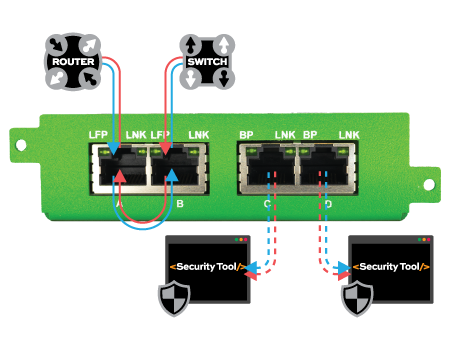
Read Blog NowNetwork Diagrams
Aggregation Mode
Request a Quote
Interested in purchasing this product? Simply fill out this request a quote and one of our team members will contact you.