<img height="1" width="1" style="display:none;" alt="" src="https://px.ads.linkedin.com/collect/?pid=2975524&amp;fmt=gif">
BLOG

Passive and Failsafe Copper TAPs: Which Option is Best for Your Network

July 30, 2026

Introduction

Copper Network TAPs are essential for gaining 100% visibility into network traffic. However, TAPs should never become a single point of failure in your IT or OT environment.  When tapping links for monitoring and / or security tools and sensors, understanding the differences between Passive and Failsafe Copper TAPs is critical for a safe network design.

This blog offers a practical breakdown to help you choose the right Copper TAP for your environment and understand the applications associated with each type.


Why TAP Design Matters in Copper Networks

Unlike fiber networks where TAPs rely on optical splitting of light, copper networks require electronic components to maintain link integrity to pass traffic. That means occurrences like power outages or accidental power loss has a direct impact on network uptime.

At Garland Technology we engineer and manufacture our Copper TAPs to prevent the TAPs from becoming a single point of failure during a power loss to the TAP. Our product line includes:

  • 10M/100M Passive Copper TAPs
  • 1G Copper TAPs with built-in Failsafe

Each behaves differently when power is lost, and understanding the differences can help you ensure network continuity.


Passive Copper Network TAPs (10/100M)

How Passive TAPs Work

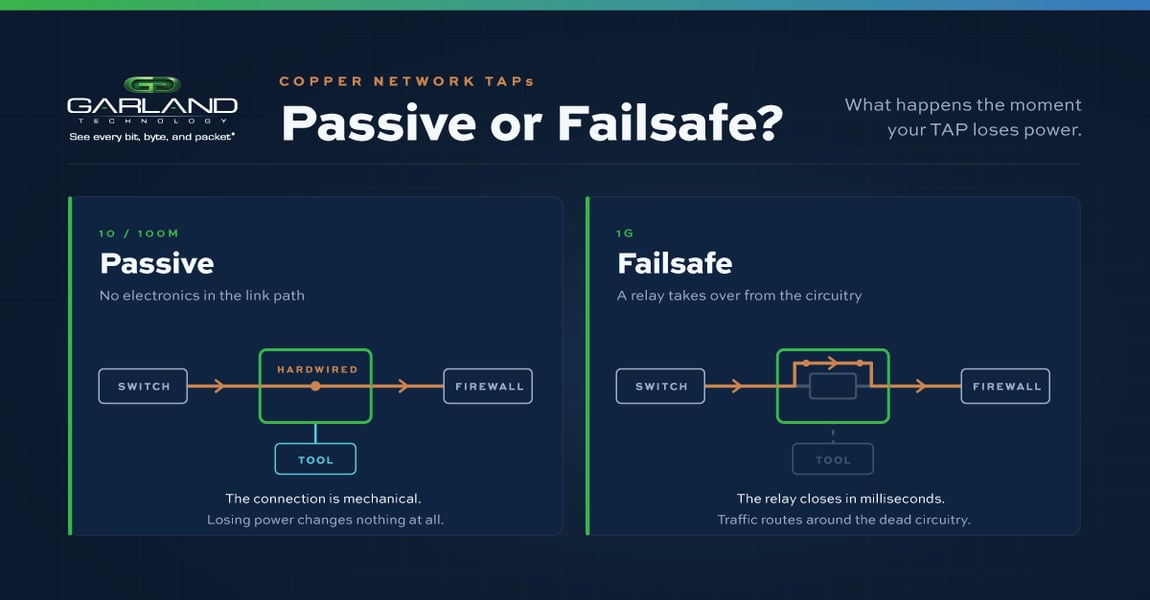
Passive Copper TAPs do not rely on active electronics to maintain the network link. Because the network ports remain physically connected even during a power cycle, traffic continues to flow uninterrupted.

Garland Technology’s passive TAPs for 10M/100M network speeds keep the network link active during both power loss and restoration. Because the TAP’s network ports remain physically connected, traffic continues to flow with zero interruption even when the TAP undergoes a power cycle.

Key Benefits

  • Zero downtime during power loss
  • Ideal for legacy or lowspeed copper environments
  • Very low risk of link failure
  • Reliability depends entirely on physical port continuity

Key Considerations

  • Only available at 10M/100M speeds with copper wiring
  • Not designed for high-bandwidth copper links


Failsafe Copper Network TAPs (1G)

At 1-Gigabit speeds, copper requires active circuitry. Without failsafe protection, a powered TAP could take down the link between the two network devices during a power loss to the TAP.

What “Failsafe” Means

Garland Technology’s 1G Copper TAPs include a built‑in failsafe mechanism that meets strict IEEE copper wiring standards. If power is lost, traffic between the connected devices continues to flow due to the internal relay that connects the network ports in just milliseconds.

Garland Technology’s CEO and CTO have been deploying this safeguard in 1G Copper TAPs for over 25 years without a complaint.

 

Copper-Network-TAPs-Failsafe-V1


Key Benefits

  • No link failure during power loss
  • Fully standards-based IEEE 1G copper design
  • Ensures continuous traffic flow if TAP loses power

Key Considerations

  • Requires power for normal monitoring operation
  • Power loss initiates failsafe mode, so monitoring tools stop receiving traffic
  • Should be connected to a UPS for added protection
  • You operate in critical OT/ICS environments where link downtime is unacceptable

If power loss is a concern, then treat your 1G Copper TAPs as you would any critical network device like a Router, Switch, or Firewall. Plug the TAP into un uninterruptible power supply (UPS).

Looking to add Copper TAPs to your network, but not sure where to start? Join us for a brief network Design-IT consultation or demo. No obligation - it’s what we love to do!

See Everything. Secure Everything.

Contact us now to secure and optimized your network operations

Heartbeats Packets Inside the Bypass TAP

If the inline security tool goes off-line, the TAP will bypass the tool and automatically keep the link flowing. The Bypass TAP does this by sending heartbeat packets to the inline security tool. As long as the inline security tool is on-line, the heartbeat packets will be returned to the TAP, and the link traffic will continue to flow through the inline security tool.

If the heartbeat packets are not returned to the TAP (indicating that the inline security tool has gone off-line), the TAP will automatically 'bypass' the inline security tool and keep the link traffic flowing. The TAP also removes the heartbeat packets before sending the network traffic back onto the critical link.

While the TAP is in bypass mode, it continues to send heartbeat packets out to the inline security tool so that once the tool is back on-line, it will begin returning the heartbeat packets back to the TAP indicating that the tool is ready to go back to work. The TAP will then direct the network traffic back through the inline security tool along with the heartbeat packets placing the tool back inline.

Some of you may have noticed a flaw in the logic behind this solution!  You say, “What if the TAP should fail because it is also in-line? Then the link will also fail!” The TAP would now be considered a point of failure. That is a good catch – but in our blog on Bypass vs. Failsafe, I explained that if a TAP were to fail or lose power, it must provide failsafe protection to the link it is attached to. So our network TAP will go into Failsafe mode keeping the link flowing.

Glossary

  1. Single point of failure: a risk to an IT network if one part of the system brings down a larger part of the entire system.

  2. Heartbeat packet: a soft detection technology that monitors the health of inline appliances. Read the heartbeat packet blog here.

  3. Critical link: the connection between two or more network devices or appliances that if the connection fails then the network is disrupted.

NETWORK MANAGEMENT | THE 101 SERIES