<img height="1" width="1" style="display:none;" alt="" src="https://px.ads.linkedin.com/collect/?pid=2975524&amp;fmt=gif">
BLOG

Precision Visibility: How Packet Filtering Transforms OT Monitoring

April 16, 2026

Garland-Technology-Network-Packet-Broker


  • How excessive video traffic from IP security cameras can overwhelm OT monitoring sensors and inflate IDS licensing costs.
  • Why most OT teams don’t need full video payloads – only camera status – and how this mismatch creates noise instead of visibility.
  • How packet filtering with Network Packet Brokers eliminates unnecessary video streams before they hit sensors.
  • The measurable benefits: faster detection, fewer false positives, lower throughput costs, and preserved camera health visibility.


Introduction

Operational Technology (OT) environments are built for reliability and uptime, but as networks scale, visibility can quickly become a double-edged sword. More data isn’t always better. In fact, without precision, it can become a burden.

Here’s a practical example and a takeaway you can apply immediately if you’re dealing with monitoring and security sensors that don’t need video traffic.

The Challenge: When Visibility Becomes Noise

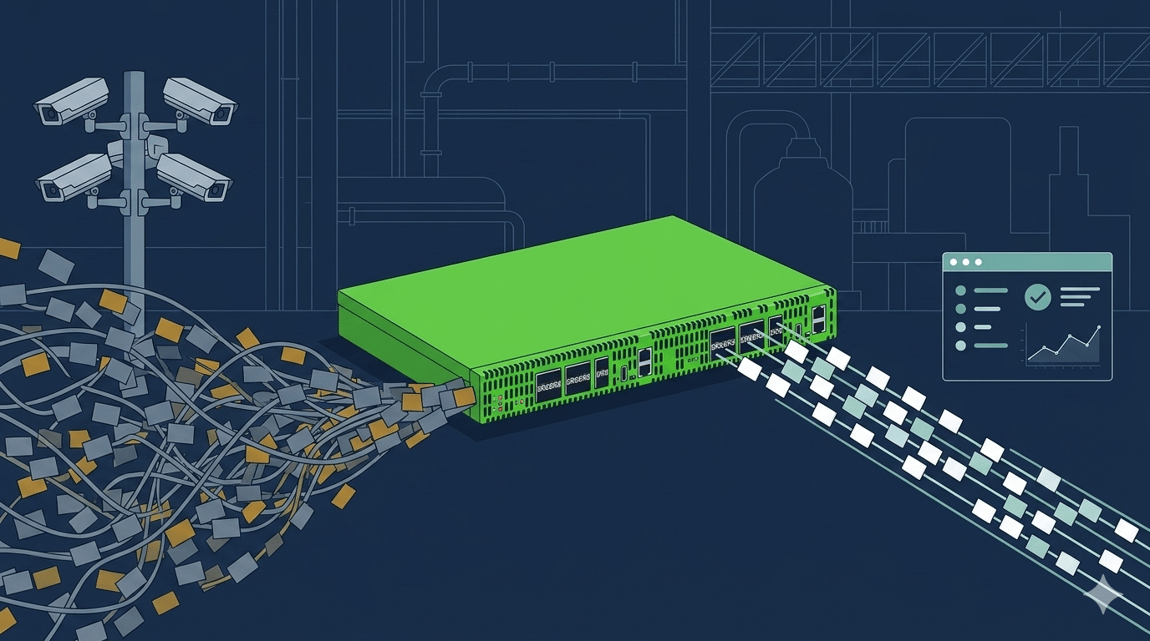
A large global exporter was dealing with exactly the kind of problem many OT network engineers quietly struggle with: too much of the wrong traffic. Their environment included thousands of daily moving assets and a rapidly expanding network footprint. Like many modern industrial operations, the company deployed extensive IP-based security cameras across facilities.

The issue wasn’t the cameras themselves. It was the video traffic.

Yet, the actual requirement was simple: know whether the cameras are online, not analyze every frame of video. This is a classic OT visibility mismatch: collecting data you don’t need, at the expense of the data you do.


The Solution: Precision Packet Filtering

Instead of scaling up sensors and increasing spending, the smarter move was to reduce the problem at the source. Using Network Packet Brokers (NPBs) with advanced filtering helped the exporter accomplish the following:

  1. Traffic Identification: video streams were programmatically identified based on defined characteristics.
  2. Selective Packet Filtering: The NPBs were configured to strip out video packets before they reach the IDS.
  3. Signal Preservation: Crucial camera connectivity and status are preserved.

The result? A data stream tailored to actual operational needs.


Benefits

This approach delivered immediate, measurable improvements across the OT monitoring environment. By reducing unnecessary traffic, the IDS was able to operate more efficiently, processing only relevant data and improving both detection speed and accuracy. At the same time, lowering the volume of traffic helped the organization stay within existing licensing thresholds, avoiding additional costs.

Importantly, operational visibility was not compromised because camera uptime and health remained fully visible without the burden of transmitting video payloads. With less noise in the system, threat detection became more precise, reducing false positives and allowing analysts to focus on what truly mattered. Additionally, the use of Packet Brokers provided long-term value, eliminating the need for recurring subscription fees (due to Garland Technology’s perpetual hardware model).


The Takeaway: Filter First, Then Analyze

The key lesson for OT network engineers is that not all traffic deserves equal visibility. Rather than sending every packet to monitoring sensors, it’s critical to evaluate whether the data actually supports a meaningful security or operational use case. In many scenarios, specifically defined data is sufficient, and full payload inspection only adds unnecessary strain on systems and budgets.

By implementing packet filtering, organizations can significantly reduce processing overhead, extend the lifespan of existing sensors, and improve overall detection outcomes. Ultimately, the goal is not to capture everything, but to focus on the data that delivers the most value.


Conclusion

In OT environments, precision beats volume every time. The goal isn’t to see everything, it’s to see what matters most. The Benefits: less data with more insights.

Looking to eliminate unwanted traffic sent to your OT monitoring sensors, but not sure where to start? Join us for a brief network Design-IT consultation or demo. No obligation - it’s what we love to do.


See Everything. Secure Everything.

Contact us now to secure and optimized your network operations

Heartbeats Packets Inside the Bypass TAP

If the inline security tool goes off-line, the TAP will bypass the tool and automatically keep the link flowing. The Bypass TAP does this by sending heartbeat packets to the inline security tool. As long as the inline security tool is on-line, the heartbeat packets will be returned to the TAP, and the link traffic will continue to flow through the inline security tool.

If the heartbeat packets are not returned to the TAP (indicating that the inline security tool has gone off-line), the TAP will automatically 'bypass' the inline security tool and keep the link traffic flowing. The TAP also removes the heartbeat packets before sending the network traffic back onto the critical link.

While the TAP is in bypass mode, it continues to send heartbeat packets out to the inline security tool so that once the tool is back on-line, it will begin returning the heartbeat packets back to the TAP indicating that the tool is ready to go back to work. The TAP will then direct the network traffic back through the inline security tool along with the heartbeat packets placing the tool back inline.

Some of you may have noticed a flaw in the logic behind this solution!  You say, “What if the TAP should fail because it is also in-line? Then the link will also fail!” The TAP would now be considered a point of failure. That is a good catch – but in our blog on Bypass vs. Failsafe, I explained that if a TAP were to fail or lose power, it must provide failsafe protection to the link it is attached to. So our network TAP will go into Failsafe mode keeping the link flowing.

Glossary

  1. Single point of failure: a risk to an IT network if one part of the system brings down a larger part of the entire system.

  2. Heartbeat packet: a soft detection technology that monitors the health of inline appliances. Read the heartbeat packet blog here.

  3. Critical link: the connection between two or more network devices or appliances that if the connection fails then the network is disrupted.

NETWORK MANAGEMENT | THE 101 SERIES