
.png?width=40&height=40&name=search%201%20(1).png)

Network security is a top priority for administrators and IT decision-makers, as cyber threats evolve and become more sophisticated. Without proper protection, networks are vulnerable to attacks that can result in data breaches, downtime, and significant financial losses. This is where inline security solutions come in, providing an essential component of a comprehensive security strategy.
Inline security is a type of security architecture that involves the use of security tools and devices to inspect and filter network traffic in real-time. Unlike out-of-band security measures like NDR and IDS, inline security devices operate directly in the path of network traffic.
This allows inline security solutions to provide immediate protection against cyber threats, including viruses, malware, and unauthorized access attempts. By deploying inline security tools such as IPS, DLP systems, and NGFW, organizations can reduce their exposure to cyber threats and enhance their overall security posture.
Inline security solutions can be implemented at various points in the network. By implementing inline security measures at strategic locations, organizations can minimize their attack surface and ensure that all network traffic is inspected and filtered for potential threats.
Inline security is an essential component of a comprehensive security strategy. Network attacks can come from various sources, including email, web browsing, and file downloads, and can range from minor nuisances to significant breaches that can compromise sensitive data and damage an organization's reputation.
Inline security solutions allow administrators to monitor and control network traffic in real-time, helping to prevent cyber threats before they reach their target. By placing security devices directly in the network path, administrators can ensure that all traffic is inspected for malicious activity.
Implementing inline security solutions with network Bypass TAPs is an industry best practice leveraged by cybersecurity professionals. The Bypass TAP is designed to be external to the inline security tool and was designed to resolve the problem of an inline security tool creating a point of failure in the network. Bypass TAPs prevent inline devices from being a single point of failure and causing network downtime. Network downtime can be costly for organizations and mean miserable, around-the-clock hours for IT professionals.
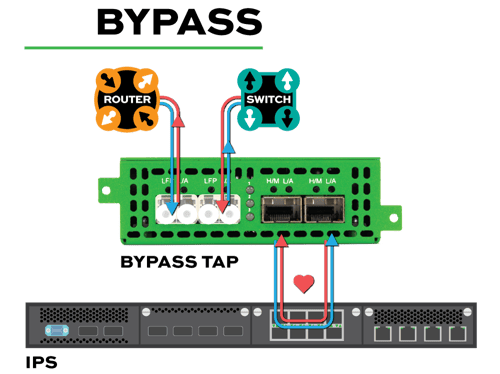
In the event the device fails or if there is a power loss, the heartbeat packets that are sent from the Bypass TAP to the inline device trigger the TAP to “bypass” that inline device. This leaves the network link up or triggering a failover to a redundant device. The heartbeats added to the redirected traffic have additional functionality: they allow the Bypass TAP to be aware of the health of an inline appliance.
Additionally, Bypass TAPs give network engineers a means to simplify tool management such as maintenance, installing patches, and making needed updates easier. Bypass TAPs allow for troubleshooting issues with the inline tool and validating the fix before putting the tool back inline. Investing in a Bypass TAP is the perfect way to add or pilot new inline devices in the future, without needing to take the network down.
Implementing inline security solutions with external Bypass TAPs requires careful planning and execution to ensure maximum effectiveness. Here are some best practices for implementing inline security solutions:
By following these best practices, you can implement inline security solutions that provide effective protection for your network and critical assets.
In conclusion, inline security solutions are a crucial part of a comprehensive network security strategy. By implementing external Bypass TAPs alongside inline security solutions, organizations can ensure that their network is protected and the tools delivering the protection are not creating any failure points in the network.
Looking to utilize Bypass TAPs with your inline tools but need help figuring out where to start? Join us for a brief network design-IT consultation and demo. No obligation - it's what we love to do!